


 |



|

MacDraft Personal Edition, an easy-to-use home design and graphic design solution to rival any other vector-based design tool on the market. Objects included in MacDraft
System Requirements for Version 6.2:
Macintosh OS X 10.8 or higher, Intel Processor, 2 GB RAM, 300 MB free hard drive space.
System Requirements for Version 6.1:
Macintosh OS X 10.6 or 10.7, Intel Processor, 1 GB RAM, 350 MB free hard drive space.
Easy-to-Use Home Design CAD, Graphic Design and Illustration.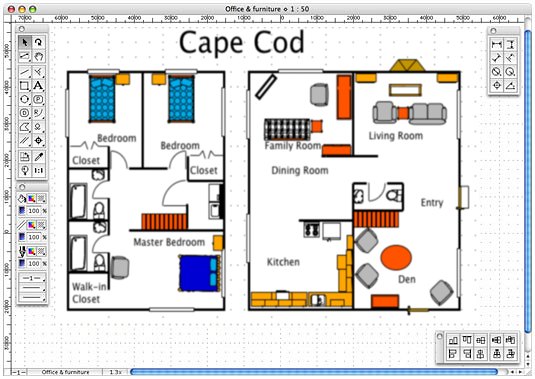 |

|
Macdraft Personal Edition is the easiest way for both the first time home design software user and the Architecture or Interiors or Landscape or Garden design pro, or just ANY type of design pro, to quickly and easily visualize home designs or other types of designs in 2D. Check out our gallery below for some examples. Macdraft does not require anything beyond OS X 10.8 or higher, Intel Processor, 2 GB RAM, and 300 MB free hard drive space. It's perfect if you are planning some upcoming improvements in your home and need to lay out furniture on a plan; or if you are wanting to create a vibrant brochure, collage or illustration; or if you are landscaping your garden and need to lay out your plants.
Gallery Welcome to the Macdraft Personal Edition gallery. Below you will find images showing exactly what MacDraft PE can do. Images (click to enlarge): | ||
 |
 |
 |
 |
 |
 |

 Image Imports and Exports
 A dimension tool for every occasion
  A fully scaled environment
  Cool tools
 FREE 2D Home, Office, and Landscape Library (for Version 6.2 or 6.1, current and former versions)
 Pinpoint accuracy object control


Drawing speed boost. Our most requested feature from you power users has been single key shortcuts for the main tools in the application. This allows you to flip from tool to tool without constantly moving the mouse away from the drawing area to select the next tool.
New star tool makes it quick to draw complicated multi-pointed stars which can be ungrouped and edited.
Creativity and feedback. Your creativity will blossom with our new Gradient Strokes and Fills allowing you to create much more professional looking illustrations and designs. In addition to this you can also add new colours, patterns and gradients without overriding the originals, which means your imagination is the only limit to your new designs. We have also updated and improved DWG/DXF import and export to support the latest DWG file types making MacDraft more compatible with other CAD resources.
More realistic feedback when dragging and drawing gives MacDraft a new feel and puts you more in control and also now you can simply drag your designs into the library for future use without holding the command key. All this makes your job faster and easier.
Bringing new features to our users is important to us and this passion continues with every upgrade. The new 6.1 version of MacDraft now incorporates a number of features to improve the visual aspect of your designs and makes the whole process fast, efficient and more importantly approachable to all designers.

We have been busy bees to get you the latest in gradient technologies. You can now create, save and store gradients in the patterns menu and apply them to shapes and objects within your designs. The gradients can be stored with the document and copied into other documents so you don’t have to create them again. Gradients are important to any design process and can bring your artwork to life.

In addition to the gradient fills you can also use the gradients when creating strokes, this impressive new feature will allow you to use gradients to create soft edges and vivid artwork, giving you the absolute control over your design techniques, making MacDraft 6.1 the best version by a long way.
Colors, gradients and patterns are increasingly more important in any design situation and with 6.1 you now have full control over your swatches from start to finish. Implemented into the new version is now the ability to create, store and save new colors, patterns and gradients and add them to the swatch list rather than replacing the existing ones provided by the application. This gives you the control you need for your design process whether it be home plans, architecture or technical illustration. Let MacDraft 6.1 give you the freedom to express your creativity.
Being able to tell exactly what you are drawing, during the draw process or know where you are dragging an item is important in any drawing application, but it’s far more important when working with a large scaled environment. The all new version 6.1 now includes a huge change to the drawing process, whereby you now get feedback consistent with the color, shape and feel of the object you are dragging of what tool you are drawing with. This has cleaned up and modernized the interface making the application much more user friendly.

Creating complicated shapes can often be tricky to get right with the use or freehand and Bezier tools, especially those shapes that require uniform attributes. New to 6.1 is the advanced star tool, incorporated into the regular polygon options, allowing you to create complex star shapes for use in your illustrations or technical drawings.

As you progress with any application and become and advanced user you could be considered a 'Power User' which basically means you can move faster than the average user when completing drawings. It has been our goal to provide speed and efficiency without losing ease of use, so we have included single key shortcuts for all of the tools. In addition to this we have made the selection of tools within groups simpler by letting you cycle through the tools groups with one single key for each, which will make the whole drawing process much faster. Single key shortcuts are a designer’s best friend when using any vector based drawing application.
In addition to the larger improvements, we have also been working on some less obvious, but still just as important updates to the way the application works. Creating custom libraries is much easier now, as all you need to do is drag the item you want to the library palette, rather than holding the command key down when you drag. You can also revert back to the Arrow tool with the ESC key, the duplicate menu has been restructured, freehand shapes can now have patterns and gradients applied to strokes and fills and other minor improvements to the interface and speed of the application. The DWG/DXF import and export has been updated and improved and now supports the latest DWG file types (AC1027) improving usability and making MacDraft more compatible with other CAD resources.
You will be creating useful drawings in no time using all the benefits of the new features:
The customizable toolbar saves you time going to the menus for frequently used commands. The drag and drop library palette makes finding items easier and so its much faster to use than previous library utilities. The new layers palette stays visible all the time amd gives constant feedback of which layer you are editing simplifying operations.
Images should not need to be preprocessed now with the image menu and new resize palette for images bringing more functionality within Macdraft PE. We have added new templates and sample libraries to help you get started with ease.
Combine these with the new coordinate system, better rulers, customizable scales and the clipped text feedback and you have the simplest and fastest 2D CAD program on the market with the genuine easy to learn Macintosh interface.

One new feature which will be most obvious will be the customizable toolbar which is a common in just about any application. A large number of commonly used menu commands and options can be accessed from there, greatly increasing the speed of working and therefore the drawing efficiency.

We have introduced a new layers palette allowing up to 5 layers, bringing Macdraft PE up to a more familiar standard for interfacing. This allows for easier manipulation of documents with multiple layers and now that the layers are constantly in view as a palette, it gives a continuous indication of what is showing in a document. You have complete control over the layers, allowing for them to be made Visible, Grayed or Invisible. You can also merge layers, which is now undoable.

A new library palette has been introduced which makes working with symbol libraries and images much easier than before. The library palette is the same as used in the Microspot Interiors applications and makes access to multiple libraries very fast and easy with the drag and drop feature. It also works with iPhoto, meaning that your photos are automatically usable from within Macdraft PE and images can be dragged from your desktop or anywhere outside of the application.

The handling of images has been vastly improved with the addition of the Image menu, containing many new controls for image manipulation ranging from adjusting the Brightness/Contrast/RGB to applying a selection of Filters. This means that images will no longer need to be pre-processed in other image editing applications, saving enormous amounts of time. You can also export the selected image in many different formats for use in other applications.

Image resizing can sometimes be complicated, especially when printing is involved. It is important that you have absolute control over all of the image aspects. The new Resize palette gives you this control allowing for manipulation of the DPI, Pixel size and Unit size. The canvas can also be edited allowing borders and transparencies to be edited along with a very precise cropping facility.
The new coordinate system may not be immediately apparent, however its implementation has allowed for a more precise drawing system. The size of drawing now adjusts to the LCD monitor resolution, meaning that we can display the size of a page more realistically, as one inch on the screen is now closer to one physical inch. This in turn makes drawing easier and faster without the need to use the zoom functions to adjust the size of your document.

Rulers are now displayed larger on higher resolution screens and have more realistic and useful divisions that adapt depending on the scale and units you have selected. Now decimal values are divided into 10 increments and fractional are divided into 8, making them more practical and easier to use than before.

The addition of customizable scales has meant that you have complete control over the scales that you use in your drawings. Allowing you to fill in any gaps in the default scales, making Macdraft PE much more flexible.
To prevent the loss of text when printing we have introduced paragraph text feedback, so than when text will not fit in the text box or may be obscured when printing, a red box will appear around it and a dialog will appear when trying to print. This option can be turned on and off via the Text menu and helps to prevent printing with incomplete text, saving time, paper and ink.

We have included a large number of useful templates to help you start using Macdraft PE. Whatever reason you are using Macdraft PE for, may it be drafting or graphic work, we have templates from CAD layouts to birthday and business cards. You can also take advantage of the sample documents and a selection of sample symbol libraries. Never before has Macdraft PE included so many extras, making designs and layouts much easier and faster.
Or get our free 14 Day Trial: |


